


OBD Scanner ELM327: GaragePro
3.2670.00 Reviews
App Specs
- Version
- 4.0.6
- Updated On
- License
- Free
- Downloads
- 1,000,000+
- Developer
- CaRPM
- Categories
- Auto & Vehicles
- Platform
- Android, iOS
Screenshots
 Analysis by AppCompare
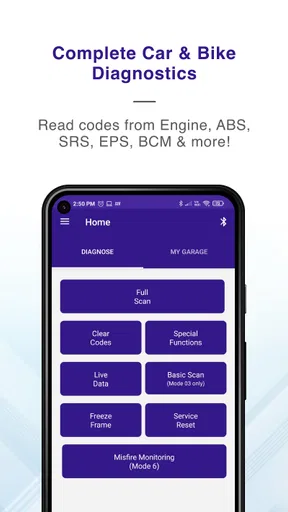
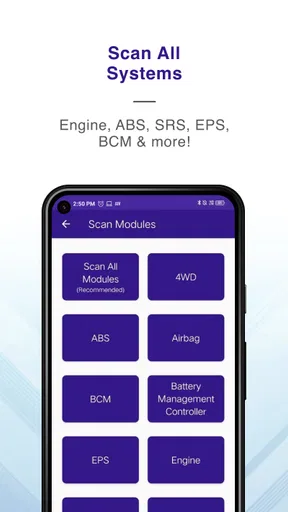
When a warning light appears, I want to know whether I’m looking at something that needs immediate attention or a problem I can investigate calmly before booking a repair. That is the kind of practical question a phone-based diagnostic tool can help with, provided I treat its readings as clues rather than a complete mechanical verdict. OBD Scanner ELM327: GaragePro is aimed at drivers who already have an ELM327 scanner and want to use a phone to read and clear vehicle fault codes, with coding functions also included.
A sensible routine begins before plugging in
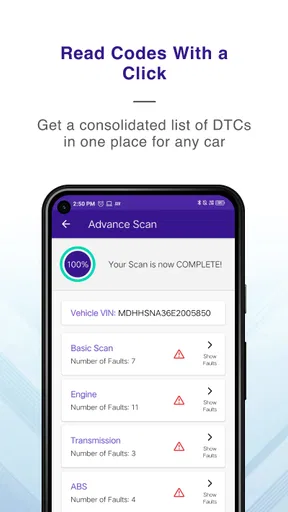
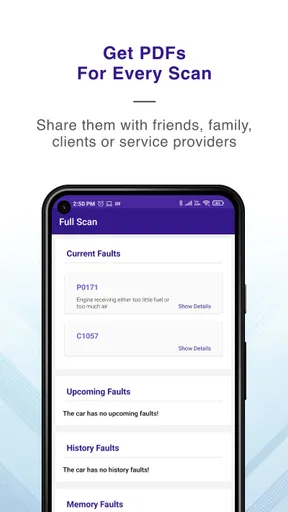
The most useful habit is to connect the adapter only when the car is safely parked, then read the codes before clearing anything. A fault code is a starting point, not proof that a particular component has failed. I would write down the code and any displayed context first, especially if the warning comes and goes. Clearing a code too early can remove a useful clue, while recording it gives you something specific to discuss with a mechanic or compare after a repair.
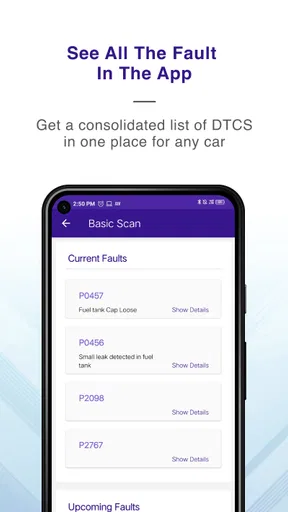
For example, imagine the engine warning light comes on during a commute, then disappears by the time you reach home. With a compatible ELM327 scanner, GaragePro can help you check whether a stored code remains. You can note what the app reports, avoid guessing at a replacement part, and decide whether the issue calls for professional diagnosis. That’s a more grounded use than clearing the warning simply to make the dashboard look normal.
Why the adapter matters as much as the app
GaragePro is not a scanner by itself: you need an ELM327 adapter that can connect to your vehicle and communicate reliably with the app. That makes adapter choice and basic connection checks part of the experience. If a scan fails, I would first confirm that the adapter is seated properly, the car is in a suitable state for diagnostics, and the phone has connected to the adapter as intended. A connection problem is not the same thing as a clean scan.
Compatibility can be a practical question even when a car has an OBD-II port. The adapter, vehicle, and app all need to work together, and support can vary by car and by the quality of the scanner. If you are buying an adapter specifically for GaragePro, check that it is an ELM327 scanner and that it suits your vehicle and phone before relying on it for a trip or repair decision. This is especially important if your goal is more than reading ordinary fault codes.
Using GaragePro with a repeatable workflow
I use a repeatable workflow to keep a code check calm and useful: park safely, connect the ELM327 scanner, read and record what appears, then decide whether anything should be cleared. Keeping a brief note of the warning and the car’s symptoms gives each later check a clear point of comparison. From there, I look at the settings and connection habits that can make this routine more dependable.
First Impressions
When I first downloaded the OBD Scanner ELM327: GaragePro app, I was immediately impressed by its clean and intuitive interface. The setup process was straightforward. All I needed was an ELM327 adapter, which connects to my car’s OBD-II port, and boom, I was ready to roll. The app seamlessly paired with the adapter via Bluetooth, which was a relief because tech glitches are the last thing I want when dealing with car issues.
Worth Reading Before You Choose

EA SPORTS FC Mobile 26 Is a Bigger Football Game, but It Takes Time

Flipboard Shows What News Apps Must Do Beyond the Feed

Switching to Android Auto Means Rethinking Your Driving Routine

Google Calendar Makes a Crowded Week Easier to Manage

Ludo King Makes the Most of the Minutes Between Plans

Baby Panda World Brings Quick Play to Modern Phones, but Its Game Library Feels Busy
Once connected, I’d keep the routine consistent: scan, record what appears, investigate the meaning, and only then decide whether clearing a code makes sense. A short note with the date, the warning light, and what the car was doing can make a later conversation with a repair shop much clearer. This also helps distinguish a one-off alert from a recurring issue. The value is not just getting a code on screen; it’s building a small, usable history instead of relying on memory.
Features That Stand Out
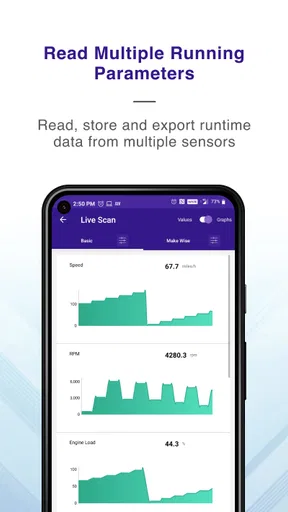
One of the coolest things about this app is its comprehensive diagnostic capabilities. It doesn’t just stop at reading and clearing error codes. Nope, it goes further, offering real-time data streaming. I could monitor everything from engine RPMs to coolant temperature. It’s like having a mini car doctor in your pocket!
Live readings are most useful when I have a question to investigate, not when I’m watching numbers without a plan. For instance, if I suspect an issue only happens after the car warms up, observing relevant readings while parked or during a safe, ordinary drive may help me describe the symptom more precisely. I would never operate the phone while driving; a passenger can observe, or I can check the app before setting off and after stopping. A stream of values can add context, but it doesn’t replace a proper inspection.
Another feature that caught my eye is the freeze frame data capability. This allows you to capture the exact moment an error occurred, giving you a snapshot of the engine’s condition at that time. Trust me, this is super handy for those hard-to-diagnose issues.
That snapshot can be especially valuable when a fault is intermittent: instead of trying to recreate the conditions from memory, you can preserve information associated with the event and take it to someone who can interpret it. I’d treat it as a clue rather than a diagnosis, since a snapshot alone cannot explain every cause. The practical tip is to review and save useful details before clearing a code, so a well-meant cleanup does not erase information you may need.
Usability and Accessibility
Now, I’m not a tech wizard, but the app was incredibly user-friendly. The menus are easy to navigate, and the information is presented in a way that makes sense even if you’re not a car expert. Plus, there’s a handy feature where you can look up error codes directly within the app, saving you a trip to Google.
That built-in lookup is a convenient first stop, but I would not let a brief description dictate a repair. The same warning can have several possible causes, and a code pointing toward a system does not necessarily identify the failed part. I use the explanation to frame better questions: Does the symptom match? Is the warning still present? Is there a repeatable pattern? If the answer is unclear, a qualified technician with suitable diagnostic equipment is the better next step.
For those of us who are visual learners, the app includes graphs and charts to help visualize data trends over time. It’s especially useful for spotting recurring issues or identifying patterns in vehicle performance.
Graphs are most helpful when I compare like with like. If I look at readings under different conditions, such as a cold start on one occasion and a fully warmed engine on another, I can easily mistake normal variation for a trend. A repeatable check under similar conditions makes comparisons more meaningful. I’d also focus on a small number of readings tied to the question I’m asking, rather than treating every available number as equally important.
Compatibility and Performance
I tested the app on both Android and iOS, and it worked flawlessly on both platforms. The developers have clearly put a lot of effort into ensuring the app runs smoothly across different devices. The only hiccup I encountered was a slight lag in data transmission on an older phone, but it wasn’t a deal-breaker.
GaragePro is an Auto & Vehicles app from CaRPM, and it is free to install. It has an average rating of 3.2 from around 6,800 ratings, alongside roughly 669 written reviews, and has been installed over a million times. The app is rated for everyone. Its current version is 4.0.6, and it requires Android 6.0 or later on Android devices. Those details make it accessible to many users, but the overall rating is a reminder to keep expectations measured: a smooth interface cannot guarantee that every adapter, vehicle, or diagnostic task will behave the same way.
Compared with a basic code-reader app, GaragePro’s appeal is that it combines code work with live readings and coding functions, so it can serve users who want more than a quick explanation of a warning. Compared with a dedicated professional scan tool, though, a phone app and ELM327 adapter are the more approachable, lightweight route, not a substitute for every workshop capability. If you only need an occasional code check and have no interest in exploring vehicle data, a simple reader may be easier. If you need dependable, vehicle-specific procedures or need to make a repair decision with safety implications, professional equipment and expertise are the better choice.
Additional Perks
The app doesn’t just stop at diagnostics. It offers maintenance reminders, which can be a lifesaver if you’re forgetful like me. You can set schedules for oil changes, tire rotations, and more. It’s basically like having a personal assistant for your car.
I’d use reminders as prompts to plan maintenance, not as a replacement for the schedule that applies to my vehicle. A useful approach is to set reminders around the maintenance work I actually track, then confirm the correct interval in the owner’s manual or with a mechanic. That keeps the app from turning into a collection of generic alerts that I eventually ignore. The feature makes most sense for an owner who likes keeping routine tasks visible in one place.
Also, there’s a cool community feature where you can share and discuss issues with other users. It’s like being part of a car enthusiast club, where you can swap tips and solutions.
Community advice can help me learn what questions other drivers ask about a symptom, but I would separate shared experience from a confirmed diagnosis. A suggestion that helped someone else may not fit my car or the conditions behind my code. I’d use discussion to generate possibilities, then check those possibilities against the actual symptoms and, when needed, a trusted repair professional. That balance lets the community be useful without turning a confident post into a parts-shopping list.
Settings worth checking before you depend on it
Before treating GaragePro as part of my regular toolkit, I would confirm that the phone and adapter pair reliably, then do a low-pressure test while the car is parked. Learn where code details and live readings appear, and make sure you know how to return to the scan rather than tapping through menus in a hurry beside the road. The goal is to remove setup uncertainty before a warning light creates stress.
It also helps to decide how you will keep notes. The app’s code lookup, graphs, and freeze-frame information can help explain what you see, but a separate written record of the symptoms and circumstances makes the result easier to communicate. Note whether the car was starting, idling, or already in motion when the issue appeared, and whether the warning returned after a scan. These small habits make a phone-based check more useful without pretending it is a complete service record.
Faster patterns for repeat checks
For repeated troubleshooting, I’d use the same order every time: observe the dashboard, connect while parked, read and record codes, review the available context, and clear only when there is a clear reason. That sequence avoids the common temptation to erase an alert first and investigate later. If the light returns, the record of what changed between checks is more useful than a vague memory that “it happened again.”
Shortcuts should mean a steadier routine, not skipping diagnosis. If I’m checking a familiar issue, I can go directly to the relevant code or reading rather than browsing every screen. But I would still pause before clearing a code or trying a coding function. Those actions have different consequences from simply viewing information, and they are not the right place to experiment without understanding what the change does for that particular vehicle.
Where the tool reaches its limits
The most important limitation is that access to codes and data does not make every repair straightforward. A code can identify a system or condition while leaving the underlying cause uncertain, and a generic adapter may not provide the same depth as equipment selected for a specific vehicle. GaragePro is strongest as a way to gather information, understand a warning, and prepare for a conversation—not as a promise that a driver can diagnose every fault alone.
Coding functions deserve extra caution. They may appeal to experienced users who already know what a change is intended to do, but I would not explore them casually just because the option is available. If I cannot explain the purpose and likely effect of a setting, I would leave it alone and seek vehicle-specific guidance. Drivers who simply want a no-risk dashboard explanation, or who are uncomfortable working with an adapter, may be happier with a basic reader or a mechanic’s diagnostic service.
There is also a cost consideration beyond installation: GaragePro is free, but it offers in-app purchases ranging from $4.99 to $299.99 per item. I would decide what I actually need before paying for anything, especially if my use is limited to occasional code checks. For a hobbyist who wants to explore more of the app, optional purchases may be worth evaluating; for a driver seeking a one-time answer, they may not be necessary.
Final Thoughts
Overall, the OBD Scanner ELM327: GaragePro is a fantastic tool for anyone interested in keeping their car in top shape. It’s packed with features that make vehicle diagnostics accessible and understandable. Whether you’re a seasoned mechanic or just someone who wants to save a trip to the auto shop, this app is worth checking out.
I’d recommend it most to curious owners who already have a compatible ELM327 scanner, want to understand warning codes, and are willing to keep a careful record rather than treating an app result as a final answer. It is less suited to someone expecting a plug-in fix, guaranteed compatibility with every setup, or a replacement for a full professional scan tool. Used with patience, a repeatable routine, and sensible caution around clearing codes and coding changes, it can make everyday troubleshooting less mysterious.
If you’re ready to take the plunge, you can download it directly from the app store. Give it a whirl and let me know what you think!
Pros
- User-friendly interface
- easy navigation.
- Comprehensive diagnostic features.
- Real-time data monitoring available.
- Compatible with multiple car models.
- Frequent updates and improvements.
Cons
- Requires ELM327 hardware to function.
- Limited features in free version.
- Some features require internet access.
- May have connectivity issues with older cars.
- Interface can feel cluttered at times.
FAQs for OBD Scanner ELM327: GaragePro
What is the primary function of the OBD Scanner ELM327: GaragePro app?
The OBD Scanner ELM327: GaragePro app is designed to diagnose and troubleshoot vehicle issues by connecting with an ELM327 Bluetooth or Wi-Fi device. It reads and clears trouble codes, monitors real-time vehicle data, and provides detailed reports. This app is essential for both professional mechanics and car enthusiasts who want to maintain their vehicles efficiently.
Is the OBD Scanner ELM327: GaragePro app compatible with my vehicle?
The app is compatible with most vehicles manufactured after 1996, which typically support OBD2 protocols. However, compatibility may vary depending on the make and model of your vehicle. It's advisable to check the app's compatibility list or consult with the app's support team to ensure it will work with your specific vehicle before purchasing an ELM327 device.
What features does the OBD Scanner ELM327: GaragePro offer?
GaragePro offers a range of features, including reading and clearing diagnostic trouble codes, monitoring real-time vehicle data, and generating comprehensive reports. It also offers features like smog test readiness, freeze frame data analysis, and customizable dashboard displays. These features make it a robust tool for both diagnosing issues and tracking vehicle performance.
Do I need an internet connection to use the OBD Scanner ELM327: GaragePro app?
An internet connection is not required for basic diagnostic functions, such as reading and clearing trouble codes. However, some features, like cloud storage of diagnostic reports or accessing certain updates, may require an internet connection. It's beneficial to have intermittent access to ensure the app is up-to-date and to utilize all its features fully.
Is the OBD Scanner ELM327: GaragePro app user-friendly for beginners?
Yes, the app is designed with a user-friendly interface that is intuitive even for beginners. It provides clear instructions and tutorials to help users navigate its features. Additionally, the app offers comprehensive support resources, including FAQs and customer support, to assist users in getting the most out of their diagnostic experience.


